Strengthening User Control of Add-ons

134

It’s no secret that Firefox users love to install add-ons — more than 1.5 million are downloaded every day from our official gallery. But users aren’t the only ones who love adding on to Firefox: third-party applications frequently install bundled add-ons into Firefox as part of their own installation process. While some of these applications seek the user’s permission beforehand, others install add-ons into Firefox without checking to make sure the user actually wants them.

These add-ons installed by third parties present a number of problems: they can slow down Firefox start-up and page loading time, they clutter the interface with toolbars that often go unused, they lag behind on compatibility and security updates, and most importantly, they take the user out of control of their add-ons.

That’s why we’re introducing two new features to ensure users have complete control over their add-ons:

Users must opt in to add-on installation

If Firefox starts and finds that another program has installed an add-on, Firefox will disable the add-on until the user has explicitly opted in to the addition. Users that want the functionality provided by a third-party-installed add-on can easily allow the installation, while users who don’t can cancel or ignore the prompt.
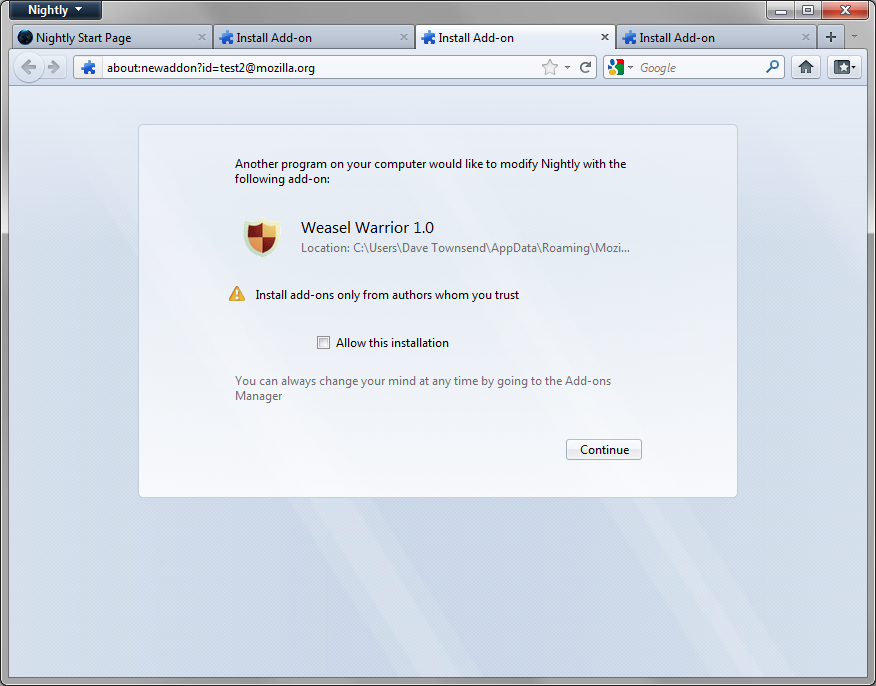
Screenshot of add-on install prompt

An opportunity to fix the past

Upon upgrading to this upcoming version of Firefox, users will be presented with a one-time dialog to select the add-ons they wish to keep installed. By default, all of the add-ons the user has installed from within Firefox will be kept, but add-ons installed by another application will be disabled unless the user chooses to keep them. Regardless of installation method, we encourage users to disable add-ons they aren’t using to improve Firefox’s performance.
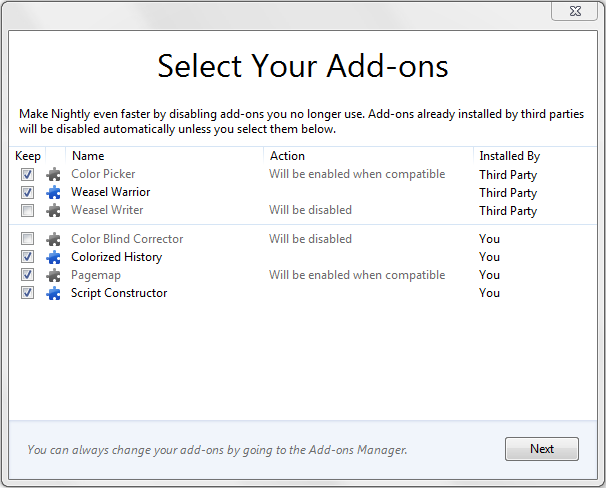
Screenshot of add-on selection dialog

If any add-ons will be disabled, the user will be asked to confirm the changes. This additional step should ensure users don’t accidentally disable add-ons they wish to keep.
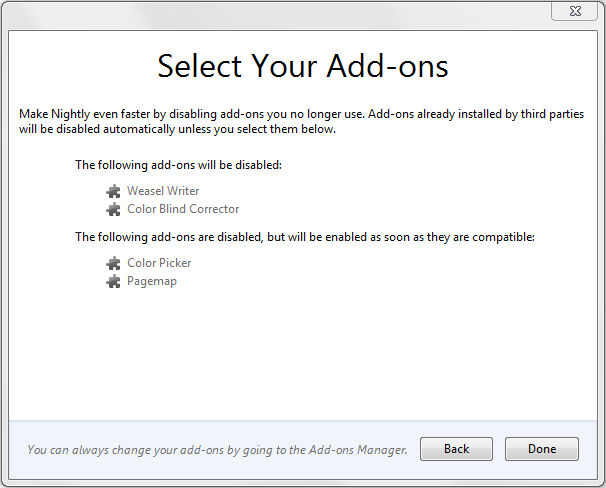
Screenshot of add-on confirmation dialog

We understand that there are legitimate use cases for some third-party add-on installations, and that those developers have done the right thing by asking users to opt in to the add-on, following our performance best practices, and providing a good user experience. Unfortunately, the extent of unwanted add-ons installed through these methods has caused us to take action, but we’re confident that users who truly want such add-ons to be installed will opt in when Firefox prompts them.

You can try out these and other new features in Firefox Aurora starting next week.

Tags: , ,

Categories: developers, end users

134 responses {+}

  1. Anonymouse

    Good job disabling language plugins by default

      ·   Reply

  2. ishita

    i cant find this window which says select your add ons.i want to make changes to it but i cant

      ·   Reply

  3. Kukulkan

    What a bad idea! Lots of people are installing our software and select the Thunderbird AddIn to get installed. Until V7, they are happy that it worked out of the box. Now, they all are calling our Hotline to tell us, that the AddOn is no longer working! New users complaining, the AddIn is not appearing! We have huge amount of calls to handle. This “security” feature costs us a lot of money! Please fix this as soon as possible.

    An alternative will be to ask the user on the next TB start:
    There is a new AddIn found: “NAME”. Should I activate this now?

    The current solution is horrible bad!

      ·   Reply

  4. Irwin Mainway

    What the hell is ‘Nightly’ ?

    via /Developer:
    “Created most weekdays from the previous day’s work, these builds may or may not work. Use them to verify that a bug you’re tracking has been fixed.
    We make nightly builds for testing only. We write code and post the results right away so people like you can join our testing process and report bugs. You will find bugs, and lots of them. Mozilla might crash on startup. It might delete all your files and cause your computer to burst into flames. Don’t bother downloading nightly builds if you’re unwilling to put up with problems.”

    I have never encountered any ‘one-time dialog to select the add-ons they wish to keep installed’ even with version 9.0. Have 3 incompatible plugins since v. 5 or 6.

      ·   Reply

    1. Amy Tsay

      @ishita @Irwin — You should have seen the “Select your Add-ons” dialog when you upgraded to the latest release (Firefox 8). If you still need help, your best bet is Firefox Support: http://support.mozilla.com/kb/ask

        ·   Reply

      1. hamed

        thanx

          ·   Reply

  5. quest

    Thank you for strengthening the security of add-ons.

    To the developers who are griping about their add-on no longer working -

    Maybe you should have designed it better in the first place and given your customers the option to auto-update all along AND INFORMED THEM OF THE OPTION! Your gripe should be targeted at your own add-on developers!

      ·   Reply

  6. Lefty

    The one-time dialogue didn’t pop up after installing Firefox 8 on Linux Mint 11.

    Slightly annoying as there is one add-on I have that I do not know how it got there, and cannot easily uninstall as does not have a uninstall button

    Is there a setting in about:config or similar to get it to appear?

      ·   Reply

    1. Martes-Martes

      My experience is the same as Lefty’s, also with Mint 11. I have three things that got installed God knows how and are now disabled, but have no remove buttons: Global Menu Bar Integration (apparently some Unity garbage), Stylish 1.0.7 (WTF?), and English (South Africa) Language Pack 8.0, English (GB) Language Pack 8.0. How do I get rid of these things altogether? Thanks!

        ·   Reply

      1. Amy Tsay

        Please check out this article for more information on uninstalling add-ons: http://bit.ly/uojDm3 If you don’t find what you’re looking for, you can ask for help here: http://bit.ly/sE63Q8

          ·   Reply

  7. James

    Does this mean that when I disable Java, it will actually stay disabled?

    At last.

    Been waiting for that for what 10 years?

      ·   Reply

  8. Kathy Chudnofsky

    I will not be upgrading until the new version supports AVG anti-virus.

      ·   Reply

  9. Alan

    I am sorry you will have to pry the add-ons from my cold dead fingers! ;-)

    No upgrade Kool-Aid for me …..

    Thanx

      ·   Reply

  10. Mele

    I just upgraded SeaMonkey 2.4 and it had this screen (I still use Fx4.01 so this was my first experience with this screen).

    It is a very confusing screen. It said ALL extensions from MOZILLA would be disabled because they are THIRD PARTY extensions. Huh? How can extensions from Mozilla itself be “third party”? Why were chatzilla, DOM Inspector, etc. disabled?

    There was no mention on this screen about Themes. Yet when SeaMonkey restarted as version 2.5, the extensions page shows that [b]SeaMonkey default theme 2.5[/b] is disabled as being incompatible with SeaMonkey. That’s really interesting considering that I am using it. I also have a Persona but the buttons are from the default theme so it is certainly not disabled.

    That screen also does not show plugins! I recently installed .NET 2, 3, and 3.5 for a new program I installed that requires .NET. I later found Windows Presentation Foundation Plugin silently installed on Fx4 but disabled automatically. On SeaMonkey 2.4 that plugin was installed and was ACTIVE! I left it that way to see what happened when I installed version 2.5 with the new Addons Compatibility screen. It was still there and active.

    I also found several extensions that 2.4 had disabled were now “magically” enabled on 2.5 because of that stupid new Addons Compatibility screen. The wording on that screen really confused me. The screen makes it more difficult, not easier, to manage your extensions after an upgrade.

    I think Mozilla should just leave the extensions alone and let us users manage them. And please, go back to using correct English. These are extensions of Firefox and SeaMonkey. They are NOT things that are added onto the outside of Fx and SM. The correct term is “extensions” not “addons” which implies something added onto the product not something that is extending the product. The two terms have very different meanings.

    I realize Mozilla decided to lump themes, extensions and plugins under the term “addons” which was one of the dumbest moves I’ve seen made by Mozilla. To avoid confusion the three categories should continue to be referred to by their respective names not called Addons as only plugins can actually be called “addons”.

      ·   Reply

  11. Gen Craft

    I agree with Kathy….no upgrade until AVG is supported

      ·   Reply

  12. Ramon

    I upgrade firefox from v7 to v8 but my favorite add-on called MEDIAPIMP was disabled, so i downgrade it in v7

      ·   Reply

    1. Amy Tsay

      Hi Ramon, MediaPimp should be compatible with version 8. We are currently working to improve the add-ons compatibility process, so stay tuned…

        ·   Reply

  13. Developer

    I have the trouble with enabling extensions when firefox is being populated the new profile folder. urer.js and prefs.js doesn’t much help ether. Seeking for the reference how to enable extensions.

      ·   Reply

  14. Developer

    Nice to have the developer service is temporally unavailable. Where do I get the information about how to return back to v7new features introduced with v8 by default. There’s must be explicitly settling for that features. How to enable extensions explicitly if they are disabled by default? I need to to it pro grammatically.

      ·   Reply

    1. Amy Tsay

      Hi Developer, the add-ons forum is probably a better place to find the answers you’re looking for: http://bit.ly/tVqlv4

        ·   Reply

  15. gman

    Please Please can someone help me find the link and to reinstall the google language translate add-on. I need to work in 2 other languages, Spanish (mostly) and French. I lost it with the install of Firefox 7 , which did NOT show me the option of keeping it or not. Is it still compatible with Firefox 8? Thank you.

      ·   Reply

    1. Amy Tsay

      Hi gman, there are several translation add-ons available here: http://bit.ly/v0LQgX

        ·   Reply

  16. salman

    Mozilla firefox sucks……..!!!! Google Chrome the best browser of the world :D

      ·   Reply

    1. ALMAS BADSHAH

      right salman

        ·   Reply

  17. imran

    thanx

      ·   Reply

  18. This Sucks

    I administer a shared Firefox installation for about 60 users and have been bitten hard by this feature. Changes like this should be phased in over several releases.

    I;m sure there is a workaround by diddling with user.js or similar but why?

    This is one of the many reasons you’re losing to Chrome.

      ·   Reply

  19. Paul

    Sorry guys, no dice until I get my security working on the browser. Everytime I look at the update, it says my security isn’t compatible. I’ve had a lot of Trojans blocked by it, and I really don’t see why I should have to do without it.

      ·   Reply

  20. Marco

    Incredibly bad step for firefox in large companys. Because addon “GPO-forfirfox” is not automatically enabled. With the Addon settings are centrally managed and applied.

    No user will agree to the addon. But it is necessary for internal company rules.

      ·   Reply

  21. tempbast

    How do I disable this? I know what add-ons are installed because I chose to install them. I don’t want to go through this manual install check every time I restart my computer.

      ·   Reply

    1. Amy Tsay

      Hi tempbast, you should see the dialog only once. If you are seeing it every time you restart your browser, we suggest heading over to support for additional help: https://support.mozilla.com/

        ·   Reply

    2. Bart K.

      You might want to take a look at your addons just to be sure of that. You’d be surprised how often third parties will slip in addons when you install common software packages.

        ·   Reply

  22. James Kroscher

    I keep getting a screen when I click Firefox —-My Web Search.com I can’t get rid of it and want to know if this is an ADD-ON or something Firefox has added. How can I stop it. Before my Firefox setup gave me the current news headlines, etc. and now I can’t get that again

    Jim Kroscher

      ·   Reply

  23. ismail manek

    hi i like add-on new firefox love it !

      ·   Reply

  24. Demetrius

    Excuse my off-topic, when user disables an addon and then installs a fresh version of it, the addon remains disabled, is this behaviour obligatory or addon author can control it to make the addon enabled automatically after manual upgrade?

      ·   Reply

    1. Jorge Villalobos

      This is outside of the add-on developer’s hands; it’s just the way Firefox deals with this case.

        ·   Reply

  25. Chronos

    This may be my last hurrah with Firefox. I do NOT need or want a freaking BROWSER to disable security add-ons and stuff I actually just because it’s updating itself for the 200th time. Jeez. Firefox 9.1 just blew away Kaspersky, Adobe CS 5, Anti-Banner and about 5 others. Well done fools.

      ·   Reply

  26. Lyssa

    Hello Firefox,

    I still don’t know how IE9 is not in the “Recycle Bin” as your browser is the BEST and thanks so much for “listening” to us users and finally disable these “hackers”,in my opinion,for dumping these “unwanted” crapola on our hard drives. Keep up the good work :)

      ·   Reply

  27. karim

    good

      ·   Reply

  28. Chris

    I´m sorry to tell you, that this feature is not very useful when using Firefox in an enterprise environment. Especially if the browser will be rolled out via a distribution software. Is there a possibility to deaktivate this feature global for all users via changing a config key?

      ·   Reply

  29. vibhor

    plz enable idm integration support

      ·   Reply

  30. jens

    installed Firefox ESR 10.0 and the noscript extension global, it is the same, extension is installed but not activated.

    In this way Firefox is not usable in enterprise environment!!!

    So for my customer installations I have to use version 7.x, is that what Mozilla wanted?

    Cheers

    Jens

      ·   Reply

  31. edgar

    I agree. Globally installed extensions should not be deactived by default.

      ·   Reply

  32. khaydar

    thank you very much

      ·   Reply

  33. thomas

    hard to understand to make an esr version of firefox but disabling all globally installed extensions by default.

    10.0.1esr is for me not usable in enterprise environment. there has to be an option to activate global extensions by default!

      ·   Reply

  34. SAMAR

    very fast downloader IDM

      ·   Reply

  35. hamadatiger

    تمام كلة مش تمام

      ·   Reply

More comments: 1 2

Post Your Comment