
A few months ago, one of my famous web developer co-workers had an oh-so-special bug filed against him requesting sound bites of some of his more famous sayings. He closed this bug with great success and all was well.
Fast forward to today and not all is well. While we have our sound clips, they are not easily accessible; lying dormant on our hard drives and MP3 players. Well folks, today I have solved this problem. I give you the ClouserW soundboard:
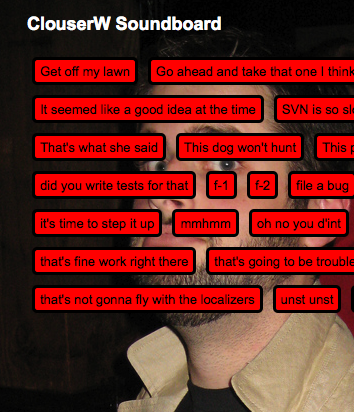
(Firefox 3.5 or higher required)
The page itself is pretty simple, I use PHP to get a list of all the sound clips from a folder and insert an <audio> tag for each one. The real magic happens in JavaScript with jQuery:
$("audio").removeAttr("controls").each(function(i, audioElement) {
    var audio = $(this);
    var that = this;
    $("#doc").append($('<button>'+audio.attr("title")+'</button>')
        .click(function() {
            that.play();
        ));
});
What I’m doing is first getting all the <audio> tags from the DOM and removing their ‘controls’ attribute. What this does is removes all default UI supplied by the browser. I’m doing this instead of simply not putting the attribute there for users with JavaScript turned off. Edit: Controls do not show up if JavaScript is turned off due to bug 449358.
Appended to that is .each(), which allows me to iterate over all of the <audio> tags individually. It will call the function I pass it once per each <audio> tag it finds.
var audio = $(this); creates a new jQuery object from a normal DOM node, which gives me a few functions that make getting information from it easier.
var that = this; is a closure to keep track of the current audio element inside the function for later execution. (Closures are outside of the realm of this blog post, if you’re interested in learning more about this powerful feature of JavaScript I recommend reading this tutorial).
I then append a button to <div id=”doc”>. The button’s text is taken from the title attribute of the <audio> tag.
Last, but not least, I attach a click handler to the button that uses the play() function of the audio tag I created a reference to above to play the soundclip.
No muss, no fuss. And no Flash 😉
morgamic wrote on
:
wrote on
:
Ian M wrote on
:
wrote on
:
c wrote on
:
wrote on
:
g wrote on
:
wrote on
:
Jeff Balogh wrote on
:
wrote on
:
John Slater wrote on
:
wrote on
:
Jeff Balogh wrote on
:
wrote on
:
rdoherty wrote on
:
wrote on
:
Justin Dolske wrote on
:
wrote on
:
robcee wrote on
:
wrote on
:
John Resig wrote on
:
wrote on
:
Frédéric Wenzel wrote on
:
wrote on
:
Brian King wrote on
:
wrote on
: